Bankruptcy
An employer name can look plausible on a draft bankruptcy schedule while conflicting with the debtor’s pay statement.
The attorney reviews the Chapter 7 draft counts, opens the Schedule I discrepancy and follows its source to the saved pay statement.
The U.S. edition is in private beta. Available sources and tools depend on your firm’s edition.
Check a Schedule I employer against the pay statement
Read the walkthrough
Where work gets stuck
A bankruptcy packet repeats financial details across forms. Income or creditor information may disagree with a statement, and staff need to see both the proposed value and its source before choosing what belongs in the petition.
Draft and review a U.S. bankruptcy petition
In the U.S. private beta, the petition workspace supports individual and joint consumer cases under Chapters 7 and 13. Start from the matter’s financial documents and case record.
Gather the financial record
Organize creditor, asset, income and expense information alongside supporting documents such as tax returns, pay stubs and account statements.
Draft the petition and supporting forms
Select Draft with AI to propose editable values for supported petition fields and schedules from the case record and available documents. Suggestions retain their sources and missing facts stay blank.
Check for inconsistencies
Use AI Petition Review to compare the forms as they would print with the case data, selected documents and verified rule data. Inspect findings, such as conflicting values or missing information, beside their supporting evidence.
Resolve findings and save a review PDF
Review proposed changes, correct or dismiss findings, and save the marked draft in Documents. Counsel checks the packet and applicable official forms before filing.
A source-backed petition draft, a list of items to resolve and a PDF for attorney review stay with the same matter.
A U.S. petition draft and its review findings
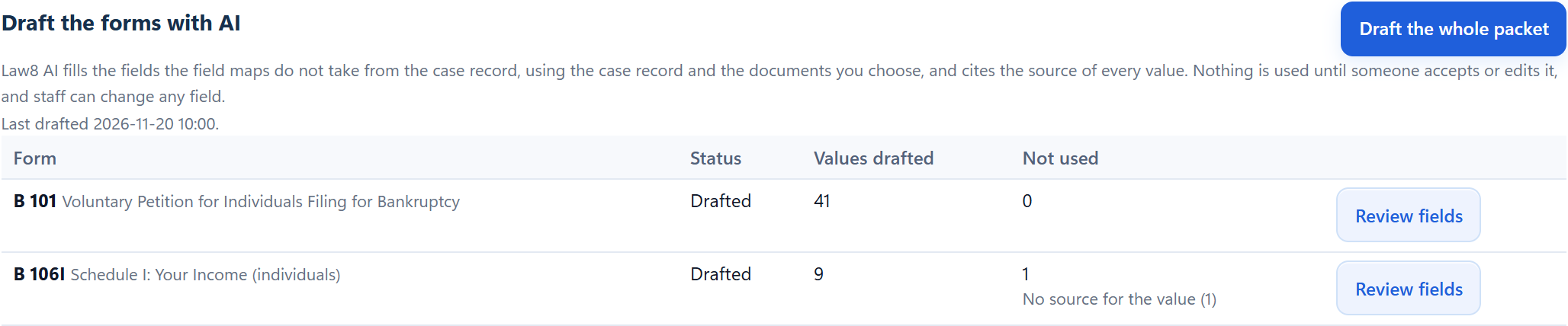
Review the draft by form
The “Values drafted” column shows what Law8 could propose. Review fields opens those values for checking. The “Not used” column surfaces entries that need a source or attorney input.
Open full size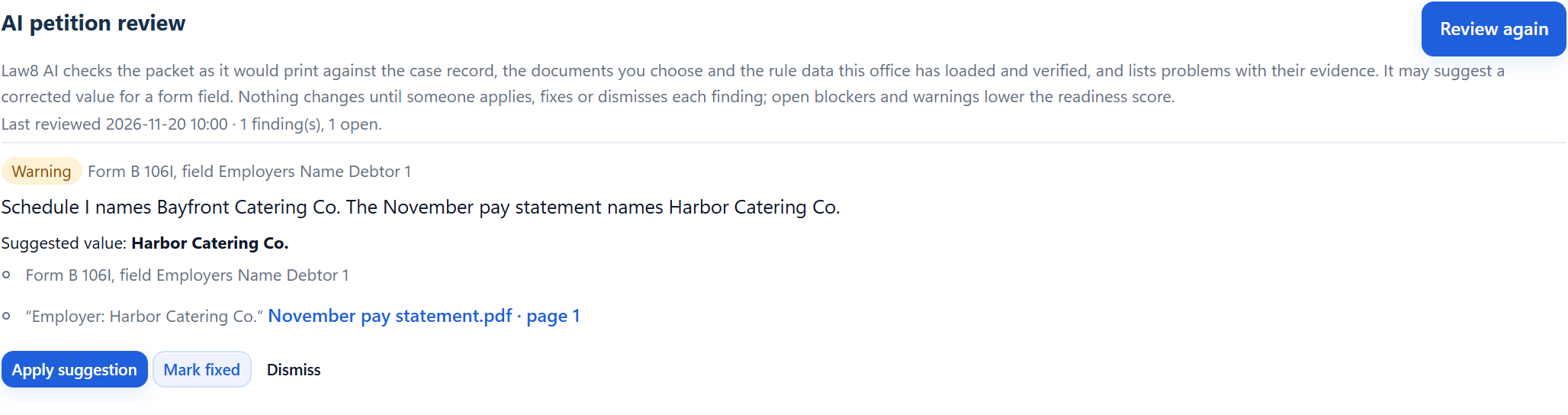
Follow the finding back to the page
The review flags a different employer on Schedule I. The link opens the page from the supporting pay statement, so the attorney can confirm the source before taking action.
Open full size