A case management platform built for your firm, with AI inside it.
ProofGuard AI designs and builds custom case management platforms for law firms, along with contract lifecycle management and intake CRM where the work calls for them. We shape the matter workspace around your practice areas and staff roles, connect it to the systems you already run, including your phone platform, billing, accounting, email and document storage, and build AI into the work itself. If your firm prefers to keep its current system, we build the AI as a standalone layer that connects to it instead.
What a custom build can include, shown in our demonstration builds.
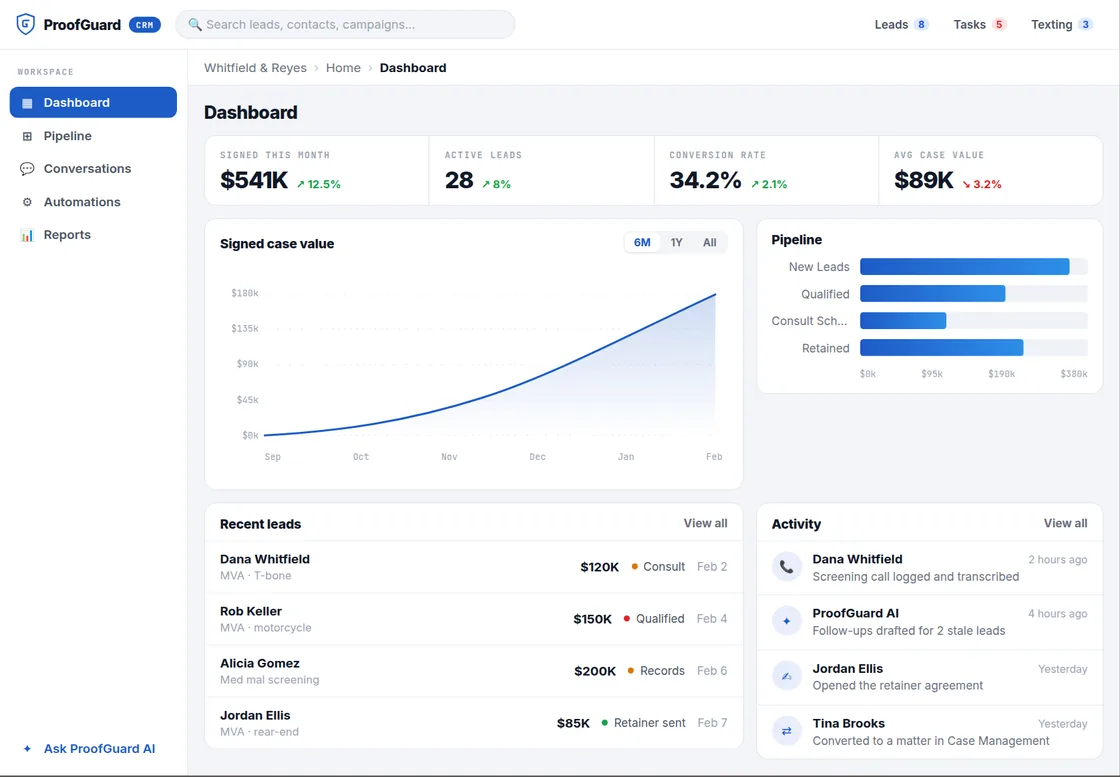
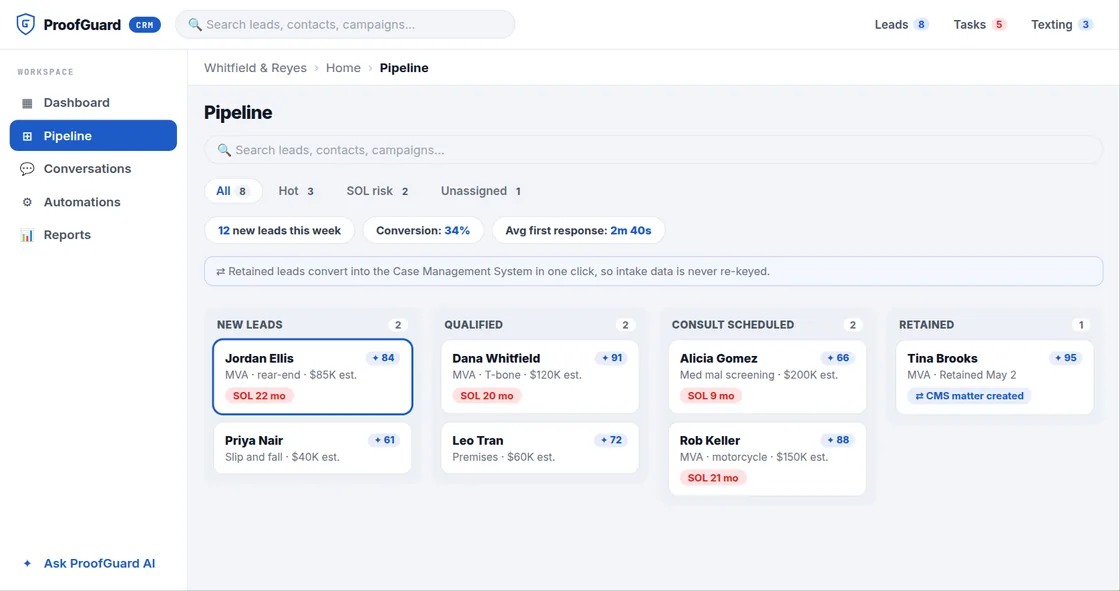
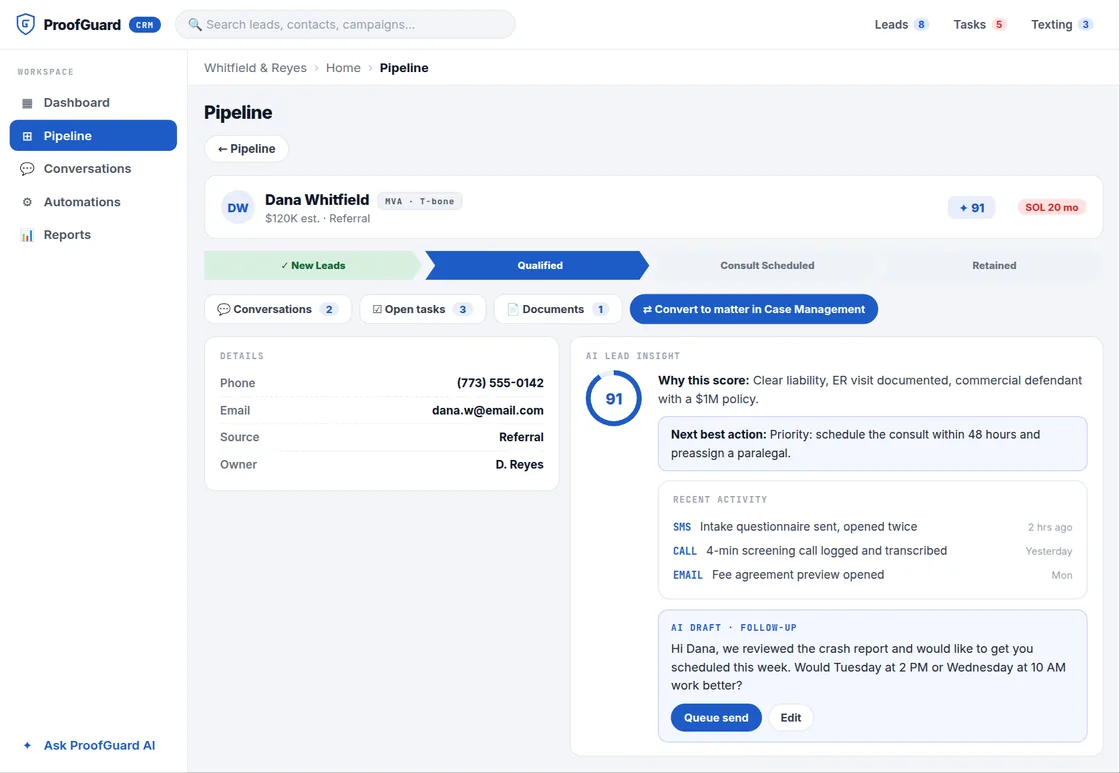
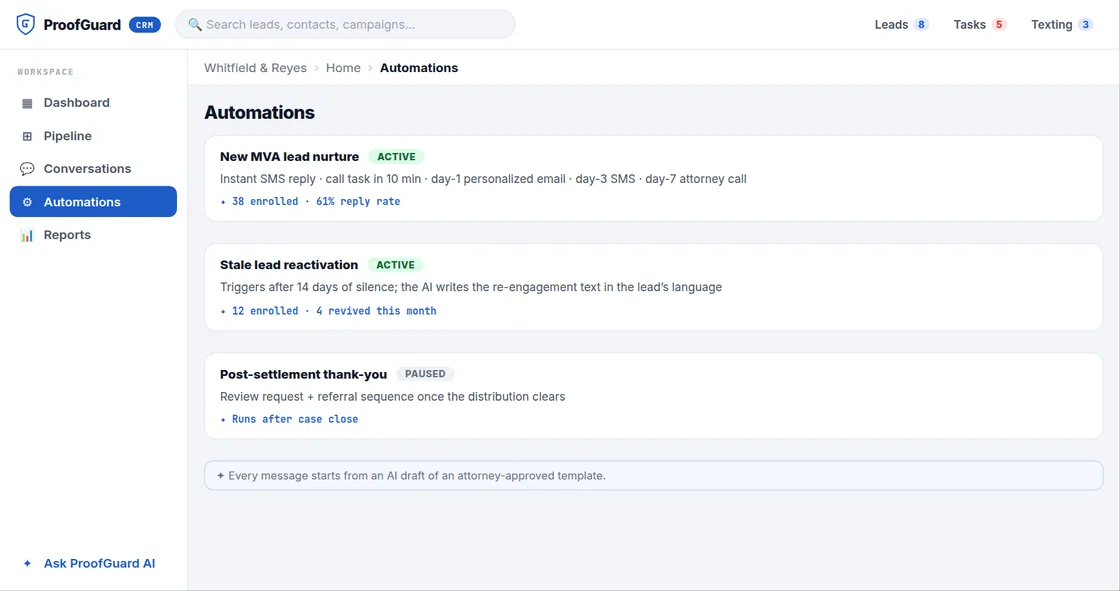
The screens below come from the demonstration above and use sample data. They show the range of platforms and AI functions we develop: a case management system, contract lifecycle management and an intake CRM, built separately or as one connected system. Your build includes the parts your firm needs, configured to your practice areas, roles and existing systems, and is confirmed in the written blueprint.
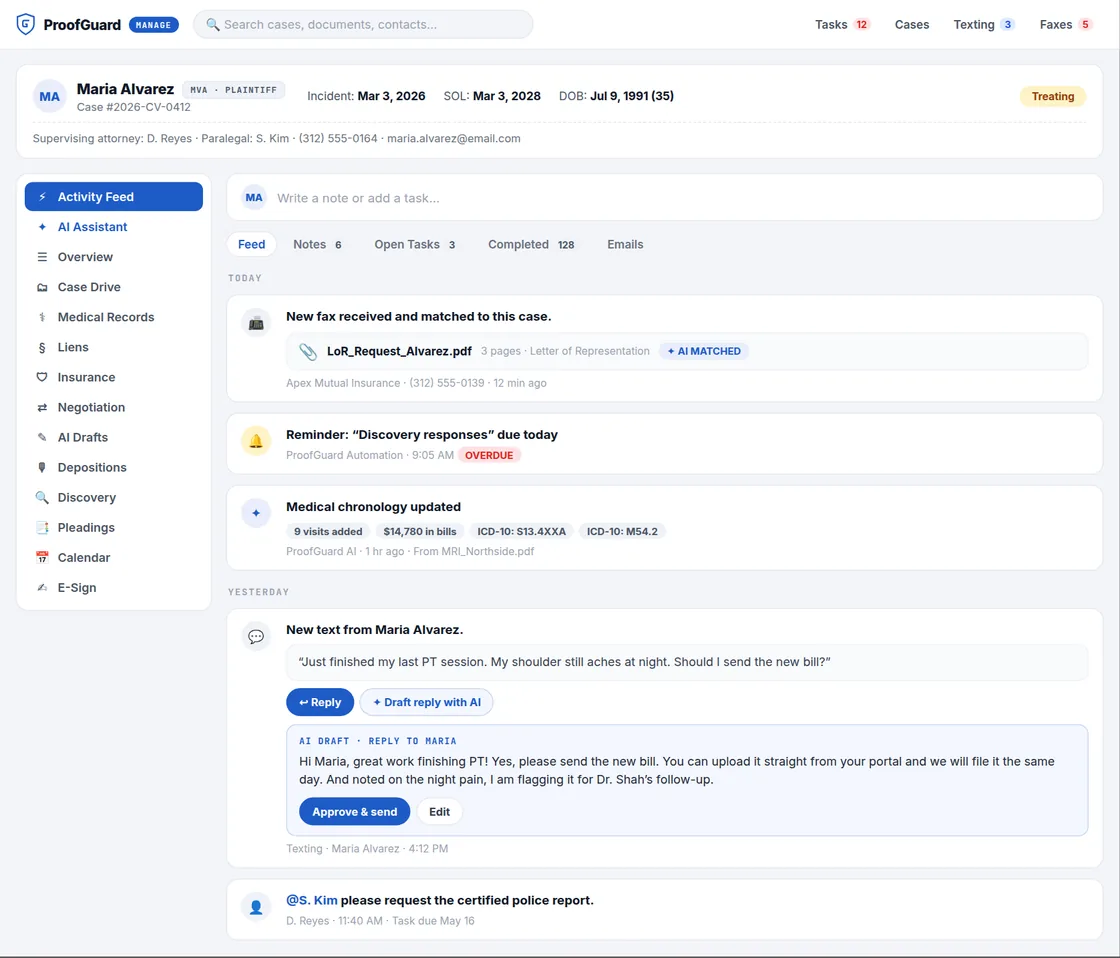
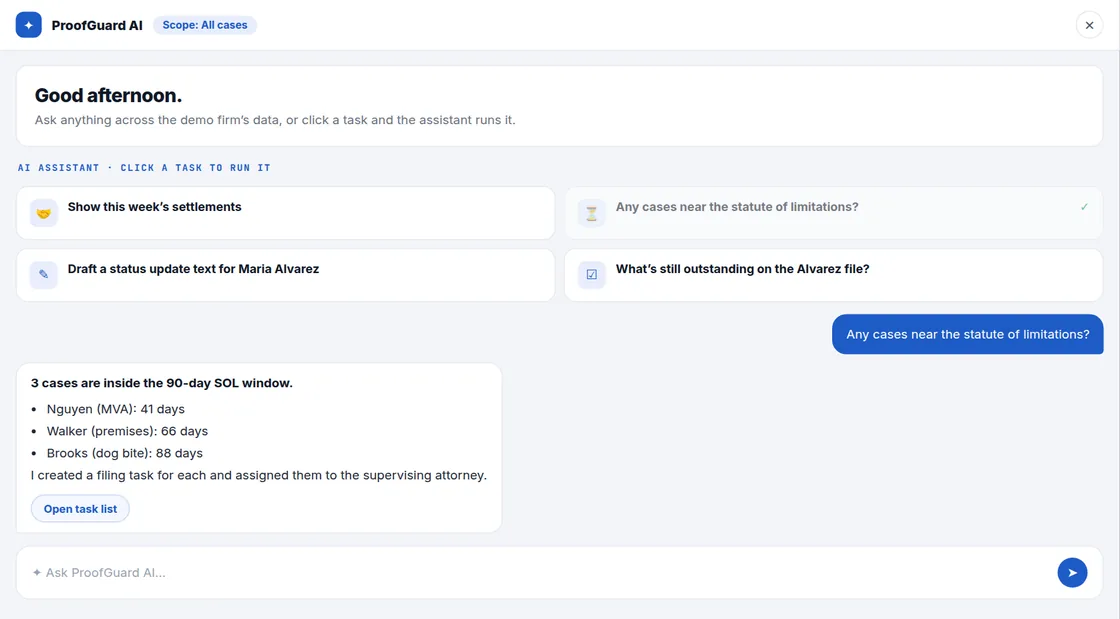
Case management system
The matter workspace, documents, deadlines, communications and an assistant that works from the firm’s records.
Contract lifecycle management
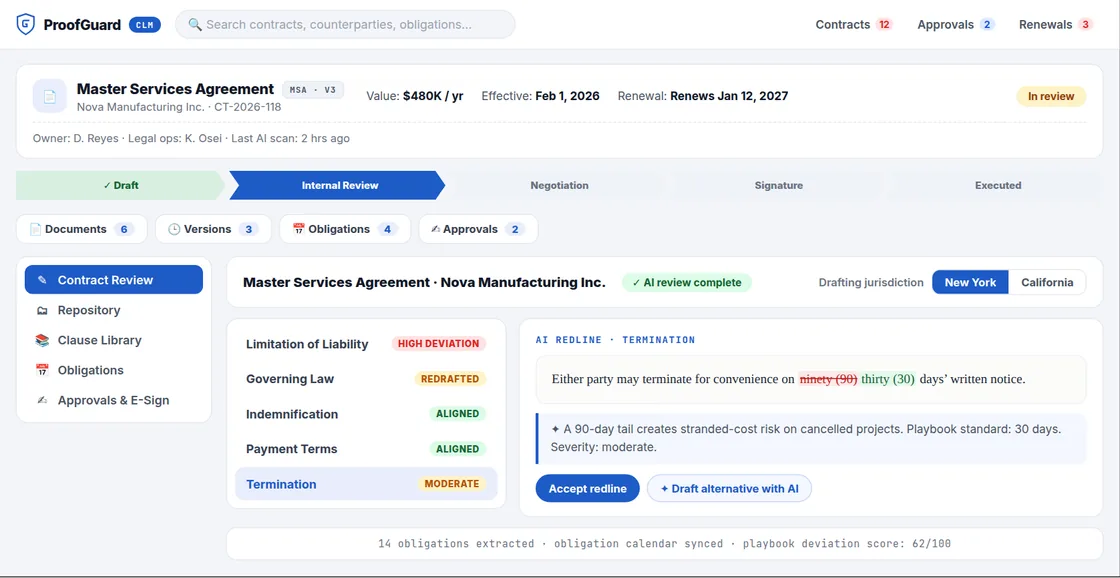
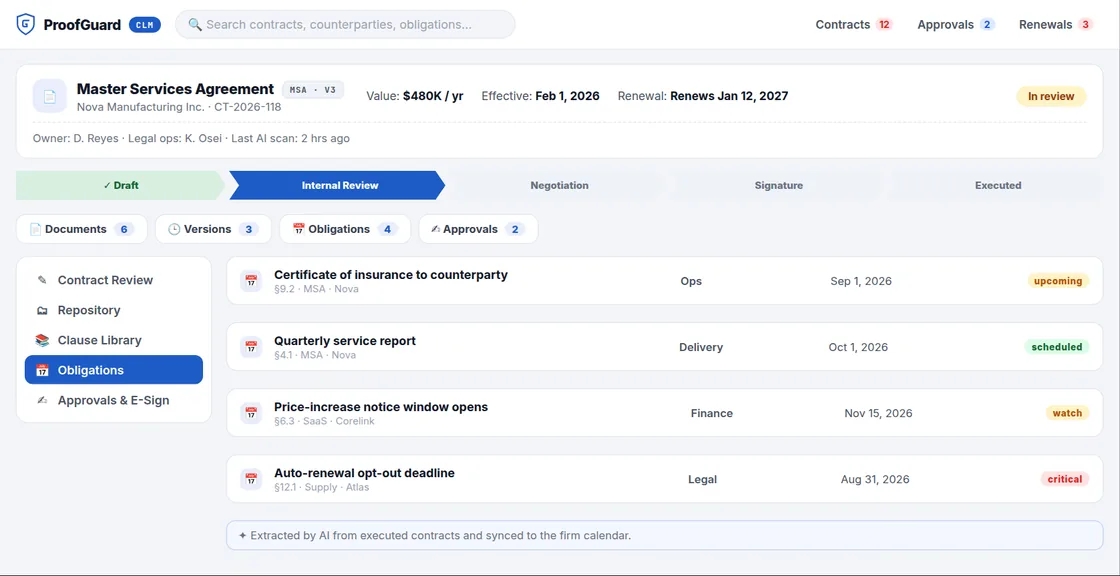
For corporate legal teams and firms with contract work: review against a playbook, obligations and approvals.
CRM and intake
Lead capture, scoring, follow up and conversion into case management, connected to the firm’s phone and messaging systems.
Keep your current system, or replace it with one built for you.
Every AI capability on this page can be delivered two ways. Standalone, it connects to the case management system and tools your firm already uses. Integrated, it is built natively into a full case management platform we develop for your firm. The scoping consultation decides which model fits.
AI connected to your existing stack
Your firm keeps its current case management, document, billing and phone systems. We build the AI as a separate tool that connects to them through their APIs, webhooks or database access, so attorneys keep the workflow they know.
- No replacement of existing tools
- Connects through API, webhook or direct integration
- Shorter build and smaller scope
- Suited to firms with a stack that already works
A full case management platform with AI built in
We develop a complete platform for your firm: matter management, documents, deadlines, intake, communications, billing and reporting. The AI is part of the platform rather than a separate tool, with one data model and one audit trail.
- Designed around your practice areas and roles
- Connected to your phone, billing, accounting and email systems
- Larger scope and a longer build
- Suited to firms replacing legacy or fragmented systems
The core of a case management platform, configured to how your firm works.
Each build starts from the bottlenecks in your firm rather than a fixed feature list. These are the components most firms need; the blueprint confirms which ones your build includes and how each is configured.
Matter workspace
Client record, parties, history, events, documents, notes and tasks on one screen, with stages and custom fields for each practice area.
Document management and automation
Folders per matter, tagging by type, templates filled from matter data, and signed documents filed back automatically.
Calendaring and deadline rules
Court dates, limitation periods and internal deadlines, calculated by rule for each practice area and synced to Outlook or Google calendars.
Tasks, queues and approvals
Shared queues, tasks assigned by matter stage, approval steps for attorney review, and alerts when work stalls.
Intake and conflict checks
Intake forms and flows for each practice area, conflict checks against prior matters and related parties, and conversion from lead to matter.
Client portal and messaging
Status updates, document uploads, invoices and payments for clients, with texts, calls and emails filed to the matter.
Time, billing and trust
Hourly, fixed fee and contingency billing, LEDES and UTBMS where clients require them, trust ledgers and reconciliation.
Reporting and dashboards
Matter stages, deadlines at risk, fee earner activity, realization and aging, with dashboards for each role.
Contract lifecycle management
Contract repository, review against the firm’s playbook, obligations, approvals and electronic signature.
Lead pipeline and follow up
Lead capture from calls, forms and referrals, scoring, follow up sequences and conversion into a matter.
Connections to existing systems
Phone, billing, accounting, email, calendar and document systems connected so data is entered once. See § 05.
Permissions and audit trail
Role and matter level access, ethical walls for conflicted matters, and a log of who viewed, changed or exported what and when.
Connected to the systems your firm already relies on.
A new platform should not force the firm to give up the phone system, payment processor or accounting software it already uses. We connect the platform, or the standalone AI, to those systems so calls, payments, emails and documents land on the right matter without re-entry.
Calls and SMS filed to the matter
Call logs, recordings and texts matched to the client, with AI summaries and follow up tasks where the firm enables them.
Inbound fax classification
Faxes received through your fax service are read, matched to the case and filed by document type.
Email to matter and calendar sync
Email and attachments filed to matters, and court dates and deadlines kept in step with attorney calendars.
Card and ACH payments
Client payments posted to the matter and to the correct trust or operating account.
Accounting sync
Invoices, payments, costs and trust transfers pushed to the firm’s accounting software without double entry.
Document storage and signing
Existing document repositories connected or migrated, and signed agreements filed back to the matter.
Connect or migrate
For standalone AI we connect to your current system. For a new platform we migrate matters, contacts, documents and history.
Firm specific tools
Medical record providers, court filing services, lead sources, internal databases and anything else the work depends on.
AI built for the work your firm actually does.
Packaged legal AI tends to solve general tasks and leave the firm to adjust its workflow around the product. We scope each engagement around the bottlenecks and working practices of your firm, then build the AI to fit them. Every capability below is available as a standalone tool or as a native module in a platform we build, and every output goes to a person for review.
Time entries drafted from the work already done.
The system reads activity across the firm’s tools, including emails, documents, calls, meetings and drafting, and drafts time entries against the right matter with the right task code and rate, including UTBMS and ABA codes for firms that bill in LEDES. Attorneys review, edit and approve. Entries that should not be billed to the client are separated so they can be checked before invoices go out.
Captures
Attorneys approve
Delivery
Matter and case AI
An assistant and dashboards that work from the firm’s own matter records.
Matter assistant
Ask what is outstanding on a matter and get deadlines, open tasks, missing documents and status, with the records each answer came from.
Matter risk dashboard
Flags matters with deadlines at risk, overdue tasks, no recent activity or spending over budget, in a daily list for supervising attorneys.
Conflict analysis
Checks beyond name matching: related entities, ownership, prior matters and opposing party relationships, with results for attorney review.
Documents and drafting
Classification, review and first drafts built from the firm’s own precedent.
Document classification
Uploads, faxes and client documents sorted into the matter folder structure, with a review queue for uncertain items and a list of what is still missing.
Drafting from firm templates
Templates filled from matter data, including narrative sections such as statements of facts, queued for attorney review.
Review and summarization
Key facts, parties, dates and obligations extracted from discovery, contracts and motions, with summaries that cite their source pages.
Citation verification
Checks that each authority cited in a brief exists and supports the proposition, and flags missing pin cites before filing.
Deposition and transcript analysis
Summaries, flagged admissions and consistency checks across multiple depositions, organized by issue.
Medical chronologies
Treatment timelines, providers, diagnoses and billed amounts extracted from medical records for injury matters.
Intake and client communication
Where the firm meets the client, connected to the phone and messaging systems it already uses.
Call and text summaries
Calls and texts from your phone platform summarized, filed to the matter and turned into tasks, with suggested replies staff approve before sending.
Intake qualification
Web intake and outreach that qualifies leads, runs a conflict pre check and books consultations, operating under scripts the firm approves.
Document collection
Checklists for each matter, reminders until each item arrives, and a check that the right document type was provided.
Billing, finance and firm reporting
Tools that connect the work to the firm’s financial systems.
Fee application drafting
Bankruptcy fee applications assembled from time entries, with task code summaries and lodestar calculations for attorney review.
Financial document review
Bank statement analysis, transaction categorization and cash flow timelines for bankruptcy, family and forensic matters.
Profitability and collections
Realization by matter type and client, aging by invoice, and collection reminders with escalation rules.
Three questions attorneys ask, answered in writing before the build.
Every engagement documents where the AI runs, where the data lives and how an output can be traced. The answers go into the statement of work, in a form your IT lead, malpractice carrier and clients can review.
01 · Where the AI runs
02 · Where the data lives
03 · What you can trace
Your data. You choose where it lives.
Custom platforms and standalone AI tools can run on your firm’s infrastructure, be managed by ProofGuard AI, or split between the two. Every option includes full export in open formats.
Your infrastructure, your control
The platform runs on your firm’s servers or private cloud. Your IT team controls the environment and we support the software.
- Matter data on your infrastructure
- Self hosted AI models on your hardware where used
- Updates on your maintenance window
We run, monitor and maintain it
A dedicated environment for your firm on infrastructure we manage. Uptime, patching, backups and monitoring are handled by our team.
- Dedicated environment, not shared with another firm
- Monitoring, patches and encrypted backups
- Updates deployed by ProofGuard AI
Sensitive data stays with you
The database and any self hosted models run on your hardware. ProofGuard AI runs the rest of the system.
- Database on your hardware
- Remaining services run by ProofGuard AI
- Support response times defined in the agreement
Six steps, quoted by scope.
Pricing depends on the capabilities in scope, the delivery model, the number of integrations and the support you choose after launch. The price is set in the written blueprint and statement of work after the consultation.
Consultation
A call with our engineering and legal team to review how work moves through your firm, which systems you use and where time is lost.
Blueprint and statement of work
A written specification covering components, integrations, data handling, cost, timeline and success criteria.
Development
An iterative build with weekly demonstrations, integrations connected and tested against your real accounts, and data migration rehearsed before launch.
Operationalization
Written procedures for how the firm uses the system, training for attorneys, paralegals and staff, and adjustments to the processes the system supports.
Launch
Go live, final data migration, handoff and documentation.
Ongoing support
Handoff with six months of support, or a managed retainer where we operate, update and extend the system.
Built by people who have worked inside law firms.
ProofGuard AI is a legal technology company that builds legal AI products, custom case management, CLM and CRM platforms, and provides managed IT and paralegal services to law firms and corporate legal teams. Legal operations experience and AI engineering sit in the same team. Learn more about ProofGuard AI →
That combination shapes how we scope a build: we start from how matters, deadlines, billing and client communication actually move through a firm, then decide where software and AI remove work.
Built around your firm
Practice areas, roles, stages and templates come from your firm, not from a product’s default configuration.
Connected to what you use
Phone, billing, accounting, email and document systems connected so information is entered once.
AI where it removes work
Each AI capability is tied to a specific task in the firm. If it does not save time or improve accuracy, it is not built.
Attorney review built in
Drafts, messages and time entries are queued for review. Nothing is sent or filed on its own.
Your data stays yours
Export matters, documents and logs in open formats at any time, with no charge to leave.
Supported after launch
Handoff with support, or a managed retainer where we keep the system running and extend it.
// Product names are trademarks of their owners and are shown as examples of systems firms use; integrations depend on each vendor’s API and are confirmed during scoping. AI outputs are drafts for review by the responsible attorney and are not legal advice.
Find the bottleneck.Engineer the fix.
Book a free discovery call. We map your workflow and show you where AI, custom software or additional capacity will reduce operating cost.